

What Is Zia AI in Zoho CRM and How Can It Actually Help Your Sales Team?
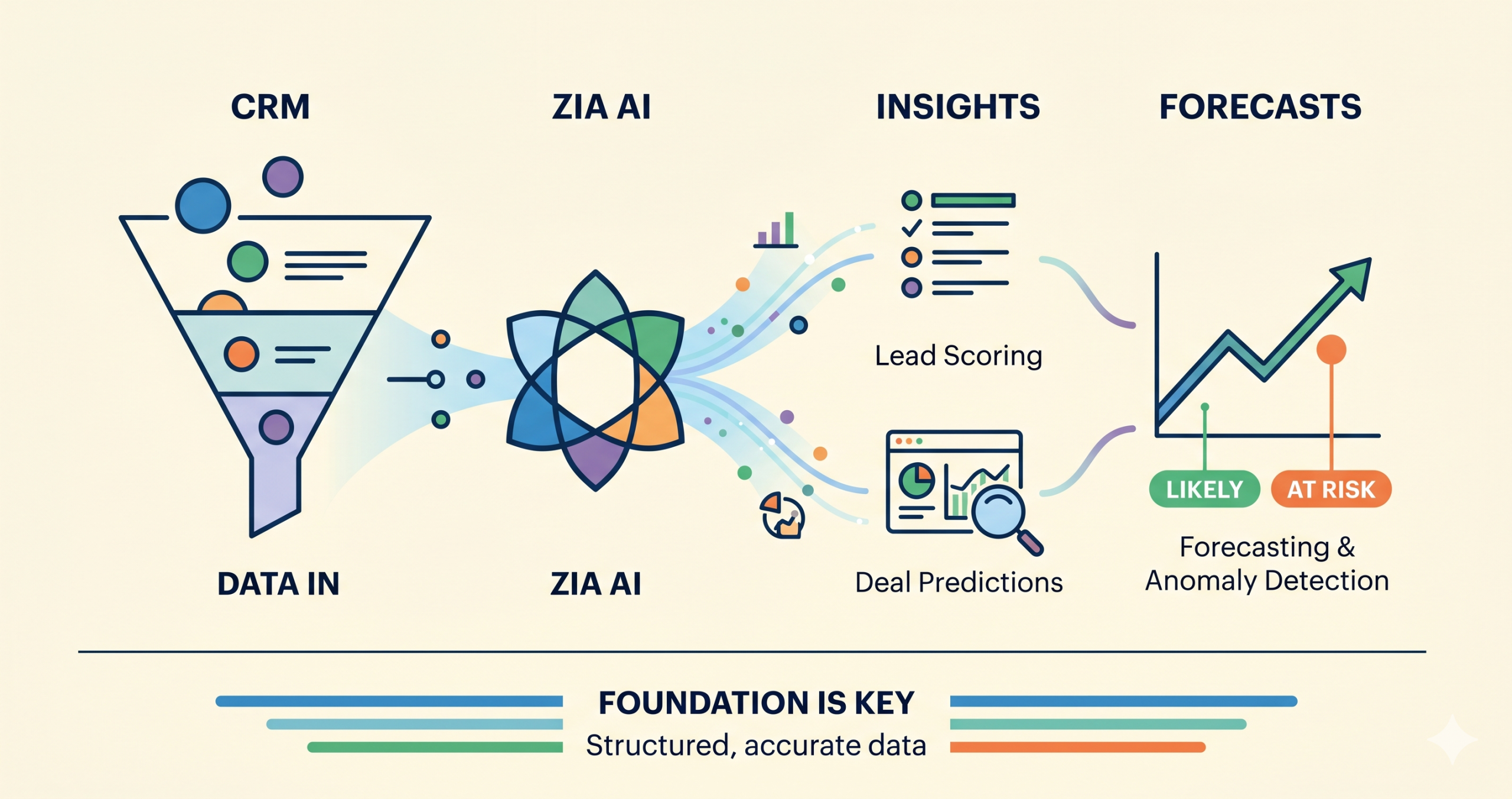
If your business is on Zoho CRM's Enterprise plan or higher, you are already paying for one of the more capable AI toolsets in the mid-market CRM space. Most teams never turn it on. Zia is Zoho's built-in AI engine. It is not a chatbot bolted onto the side of your CRM. It is an intelligence layer woven directly into Zoho CRM, trained on your actual business data: your deals, leads, emails, activity history, and conversion patterns. When it is configured correctly, it can tell you which leads are most likely to convert, which deals are quietly drifting toward lost, and where your forecast is likely to break down before it does. This article breaks down what Zia actually does, what you need to activate it, and what is genuinely worth using.
What Is Zia AI in Zoho CRM?
Zia is not a single feature. It is a collection of AI-powered capabilities grouped across five areas: predictions, automation, analytics, communications, and generative AI. The key distinction worth understanding is this: Zia reads your data, not generic training data. It learns from what has actually happened inside your CRM. Which leads converted, how long deals typically take, what patterns show up before a deal goes cold. That specificity is what makes it more useful than a general-purpose AI assistant for sales analytics. The practical result is a system that, when properly set up, surfaces insight your team would otherwise have to dig for manually.
What Plan Do You Need?
Zia's full feature set requires Zoho CRM Enterprise or above, or Zoho One. Some lighter features are available at lower tiers, but the capabilities that provide real business value, including lead scoring, deal predictions, anomaly detection, forecasting intelligence, and generative AI, sit at Enterprise and above. If you are on the Enterprise plan and have not activated Zia, you are paying for capabilities you are not using.
The Zia Features Most Worth Activating
Not all Zia features deliver equal value. Here are the ones that make a measurable difference for growing sales teams.
Lead Scoring
Zia analyzes your historical CRM data, which leads converted and what those leads had in common, and builds a predictive model that assigns every new lead a score based on their likelihood to convert. Scores appear directly on lead records. Your team can sort and filter by score, ensuring the highest-probability prospects get contacted first rather than working through the queue in order of arrival. One important note: Zia needs at least 75 converted leads in your CRM history to build its initial model. The accuracy improves as more conversion data accumulates. If your pipeline history is thin, this feature will take a few months to become reliable. For teams generating consistent lead volume, this is one of the highest-impact features Zia offers.
Deal Predictions and Win Probability
Every open deal in your pipeline receives a Zia-generated win probability score based on deal value, current stage, time in stage, recent activity, and comparison against similar historical deals. Deals that are drifting: no recent activity, stuck in the same stage too long, or showing a drop in engagement, surface automatically in Zia's insights panel. For sales managers, this is a meaningful shift. Instead of waiting until the end-of-month review to discover which deals are at risk, Zia flags them while there is still time to act.
Sales Forecasting with Anomaly Detection
Zia adds a layer of intelligence on top of your standard Zoho CRM forecasts. It detects anomalies in target achievement, identifies gaps between projected and likely revenue, and surfaces suggestions for closing those gaps. It can also assign forecast targets calibrated to individual rep performance history, rather than applying a flat number across the team. This pairs well with the broader forecasting structure in Zoho CRM. If your pipeline is already clean and your stages are well-defined, Zia's forecasting becomes a genuinely useful signal rather than another data point to question.
Best Time to Contact
Zia analyzes engagement patterns for each contact and recommends the optimal time to reach out based on when that person has historically been most responsive to calls and emails. This feature requires almost no setup and delivers a straightforward improvement: outreach happens at better times, and engagement rates go up without any additional effort from the rep.
Email Sentiment Analysis
Zia reads incoming emails from your contacts and classifies them as positive, negative, or neutral. The classification appears alongside the email in the contact's activity timeline. For managers reviewing team communications, or for reps preparing to respond to a difficult thread, this provides fast context without reading every email in detail. Negative sentiment on a deal record is a signal worth knowing about before your next call.
Ask Zia (Natural Language Analytics)
One of the most accessible Zia features is the ability to query your CRM data in plain language. Instead of building a custom report, you can ask a question like "which leads from LinkedIn have not been contacted in the past 30 days" and receive a filtered result instantly. For business owners and sales managers who want visibility without learning Zoho's reporting interface, this is a meaningful capability. It lowers the barrier to getting answers from your data.
Workflow Suggestions
Zia monitors repetitive patterns in your team's CRM activity. When it detects that certain tasks, field updates, or follow-up sequences occur consistently after specific triggers, it proactively suggests a workflow rule to handle them automatically. Rather than requiring your administrator to identify automation opportunities from scratch, Zia surfaces them based on what your team is already doing. For teams with an under-automated CRM, this can accelerate cleanup significantly.
The Catch Most Teams Miss
Zia's capabilities are real. But they come with a fundamental dependency that most teams overlook. Zia learns from your data. If your data is inconsistent, your predictions will be unreliable. If stage movement reflects internal activity rather than genuine buyer commitment, Zia's win probability scores will drift. If close dates keep getting pushed forward without discipline, the forecasting model will learn the wrong patterns. If leads are never properly closed out as lost, the scoring model gets a distorted picture of what conversion actually looks like. Zia amplifies the quality of your structure. It does not fix a broken one.
Zia Is Only as Good as the Structure Underneath It
This is the point most discussions about Zia skip over. Before activating AI features, your CRM needs a clean foundation:
- Clearly defined pipeline stages based on buyer behavior, not internal tasks
- Consistent exit criteria that your team actually follows
- Stale deals closed out or moved to a nurture process
- Close dates that reflect reality, not optimism
- Fields filled in consistently, not selectively
When that foundation is in place, Zia's predictions are meaningful. When it is not, you are training an AI model on noise. This is not a reason to avoid Zia. It is a reason to build correctly before activating it.
Common Mistakes When Activating Zia
Enabling everything on day one. Zia requires data to learn from. Turning on all features at once, before the system has enough history, produces unreliable output and erodes trust quickly. Treating Zia scores as final answers. Zia's predictions are inputs to rep judgment, not replacements for it. A high score does not mean a rep should stop thinking. A low score does not mean a prospect should be ignored. Skipping the data quality step. If your CRM has years of inconsistent data, Zia will learn from that inconsistency. A cleanup pass before activation is worth the investment. Activating Zia before your team understands it. Sales reps who do not understand why a score is appearing will either ignore it or distrust it. A brief training session on what Zia is doing and why matters more than most teams realize.
What Good Zia Usage Actually Looks Like
When Zia is configured on a clean foundation, the experience is noticeably different from a standard CRM. Reps start their day with a prioritized lead view, sorted by Zia score, rather than working through records in arrival order. Managers get deal risk alerts before the pipeline review, not during it. Forecasts become more stable because the model is trained on consistent data. Leadership asks fewer questions about the numbers because the numbers are more reliable. The goal is not to make your CRM feel more sophisticated, it’s to make the decisions your team makes every day a little clearer and a little faster.
Final Thoughts
Zia AI is already included in your Zoho CRM Enterprise plan. For most teams, that means real predictive intelligence, better forecasting, and cleaner pipeline visibility is within reach without buying anything new. The gap between having it and using it effectively comes down to two things: activating the right features in the right order, and building on a CRM structure that gives Zia quality data to learn from. If you are already on Zoho CRM Enterprise and want to know which Zia features would have the most immediate impact for your team, book a consultation and we will take a look at your setup together. ➔ Schedule a free consultation